Daily Frame — Daily Bing & Unsplash Wallpapers for Mac
Daily Frame is a tiny, native macOS menu bar app that puts a fresh desktop wallpaper on your Mac every day — automatically. Think of it as the Bing Wallpaper app from Windows, reimagined for the Mac, with Unsplash as a bonus source. It’s free and open source.
⬇ Download for macOS View on GitHub
Free · Open source (MIT) · macOS 13 Ventura or later · ~1 MB download
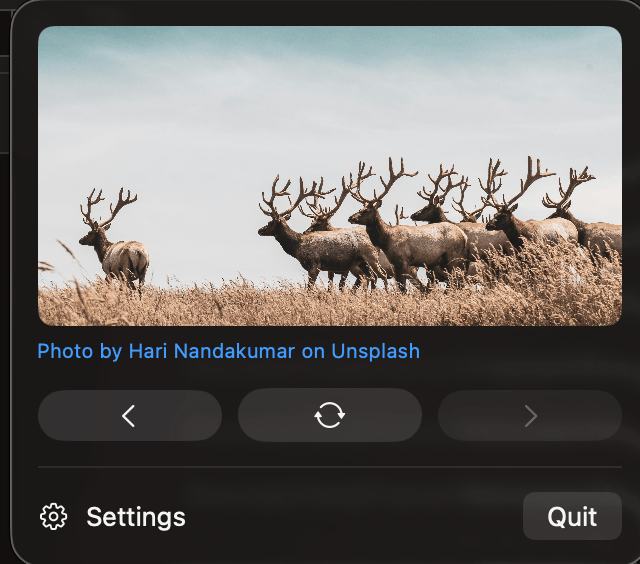
One new wallpaper a day, zero fuss
Set it once and forget it. Every day, Daily Frame quietly fetches a beautiful new photo and sets it as your desktop background across all your displays. No Dock icon, no windows, no accounts, no telemetry — just a small icon in your menu bar when you want to change things up.
Features
- 🖼️ A new wallpaper every day, applied automatically.
- 🔀 Two sources you can switch any time — Bing Image of the Day or Unsplash.
- ⏮️ Previous, Change & Next to browse recent days or re-roll the wallpaper instantly.
- 🚀 Launch at login, so it’s working from the moment you sign in.
- 🖥️ Multi-monitor aware — all displays, or just the main one.
- 🏷️ Photo credit shown in the menu, linking back to the photographer.
- 💾 Save today’s image to your Pictures folder with one toggle.
- 🧹 Stays out of the way — a menu-bar-only app, nothing else.
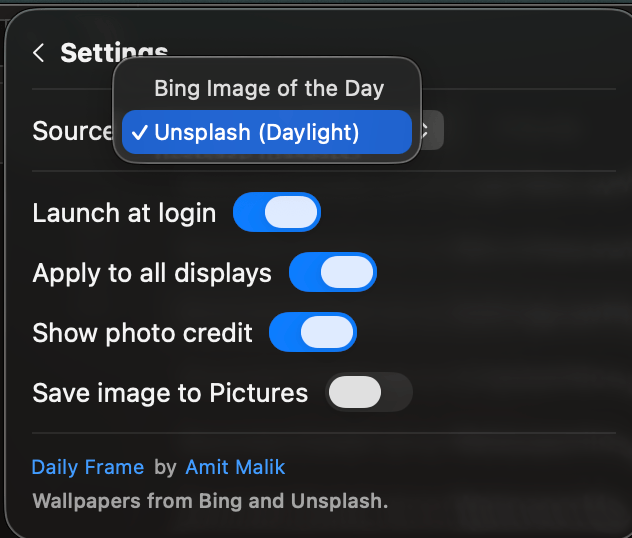
Where the wallpapers come from
Daily Frame bundles no API keys — it’s a thin client around two public image sources:
- Bing Image of the Day — Microsoft’s hand-picked daily photo. Images are © Microsoft and its content partners.
- Unsplash (Daylight) — gorgeous community photography, fetched through the Bonjourr project’s public proxy. Each photo links back to its creator under the Unsplash License.
Install in 30 seconds
- Download
DailyFrame.dmg. - Open it and drag Daily Frame onto the Applications folder.
- Launch it. Because the app is ad-hoc signed (not notarized), macOS may warn you the first time — right-click the app → Open, then confirm. You only do this once.
A small photo icon appears in your menu bar. Click it to change wallpapers, browse recent ones, or open Settings.
How it works
Daily Frame is written in Swift with SwiftUI’s MenuBarExtra. Once a day — and whenever your Mac wakes from sleep — it checks whether a new day has begun, downloads the latest photo, and sets it as your desktop picture using macOS’s native wallpaper APIs. That’s the whole app. The full source code is on GitHub.
Good to know (limitations & no guarantees)
- It changes your wallpaper — that’s the point. You can limit it to your main display in Settings.
- Not notarized. The app is ad-hoc signed, which is why you’ll see a one-time Gatekeeper prompt on first launch.
- Needs an internet connection to fetch new images. Offline, it simply keeps your last wallpaper.
- The image sources are outside the app’s control and may change. The Unsplash option in particular relies on a third-party proxy that could rate-limit or change over time.
- No warranty. Daily Frame is a personal, open-source hobby project provided “as is,” under the MIT license. It is not affiliated with or endorsed by Apple, Microsoft, Unsplash, or Bonjourr.
Frequently asked questions
Is Daily Frame free?
Yes — completely free and open source under the MIT license. There are no ads, accounts, or in-app purchases.
Which macOS versions are supported?
macOS 13 Ventura or later, including Sonoma and Sequoia, on both Apple Silicon and Intel Macs.
Why does macOS say it can’t verify the app?
The app is ad-hoc signed rather than notarized with a paid Apple Developer ID, so Gatekeeper asks you to confirm. Right-click the app and choose Open the first time. If you’d prefer, the source code is public and you can build it yourself.
Does it work with multiple monitors?
Yes. By default it sets the wallpaper on every display; you can switch to main-display-only in Settings.
Where are the wallpapers from?
Bing’s Image of the Day or Unsplash — whichever you choose in Settings.
Daily Frame is open source. View the code, report issues, or contribute on GitHub. Built by Amit Malik.